For many small business owners, the first question about AI automation isn't "what can it do?" It's "what will this cost me, and how do I know the bill won't keep growing?"
That's a fair question. A lot of AI pricing online is vague, and plenty of it is a monthly subscription for a tool you then have to set up yourself. Below is how the cost of AI automation for a small business is actually built up, and where it's worth paying for. If you only came for the cost part, skip straight to it.
The worked example here is how we price work at OVERLORD Team, because that's the pricing we can explain line by line. There are no other firms' prices or made-up savings figures below. Where a task is described being automated, it's an example scenario, not a client result.
What AI automation means for a small business
For most small businesses, an "automation" is a task that runs on its own every time something happens. An email arrives, a form is submitted, an invoice lands in a shared inbox. AI is the part that reads messy input (a free-text enquiry, a scanned PDF) and turns it into something your systems can use.
People also ask about the best AI agents for small business. An agent is an automation that can decide between a few next steps by itself. That flexibility is useful, but it's also where things go wrong, so starting small makes sense. Our rule is that a person approves anything that reaches a customer. The AI drafts, sorts and extracts. Someone on your team clicks send.
If a task needs proper software behind it, such as a customer portal or an internal tool, that's custom software development, a separate job.
What AI automation costs, and what drives the price
Short answer: there isn't one honest number for "AI automation cost". There is an honest way to break a quote down, though, and once you see the parts, comparing quotes gets much easier.
The three cost lines
We price each automation as separate lines:
- Build: scoping the task, connecting your systems, writing and testing the logic.
- Ongoing care: watching it run, fixing it when an upstream system changes, flagging failures so they aren't silently swallowed.
- Platform and AI model usage: hosting, plus the cost of the AI calls each run makes.
The third line is where that worry from the top, the bill that keeps growing, comes from. People are right to watch it. Usage grows with volume. That's why our quote states a monthly cap, so a busy month can't turn into a surprise invoice. If another provider can't tell you how usage is capped, ask before you sign.
What pushes a quote up or down
These are the things that matter when scoping:
- How many systems the automation has to read from and write to
- How clean the input is (typed web forms are easy, handwritten scans are not)
- How many runs a month you expect
- How many approval steps you want before anything goes out
- How many awkward edge cases the task has, and what should happen with each one
A task that touches one inbox and one spreadsheet is a very different job from one that spans your CRM, accounts software and a supplier portal.
Why the scope comes before the price
We write the scope down first: what triggers the automation, what it does, what it must never do, and who approves what. The quote follows from that document. It's slower than throwing out a number on a call, but it means the price matches what you're actually getting. You can read the current structure on our pricing page.
Where automation pays off first
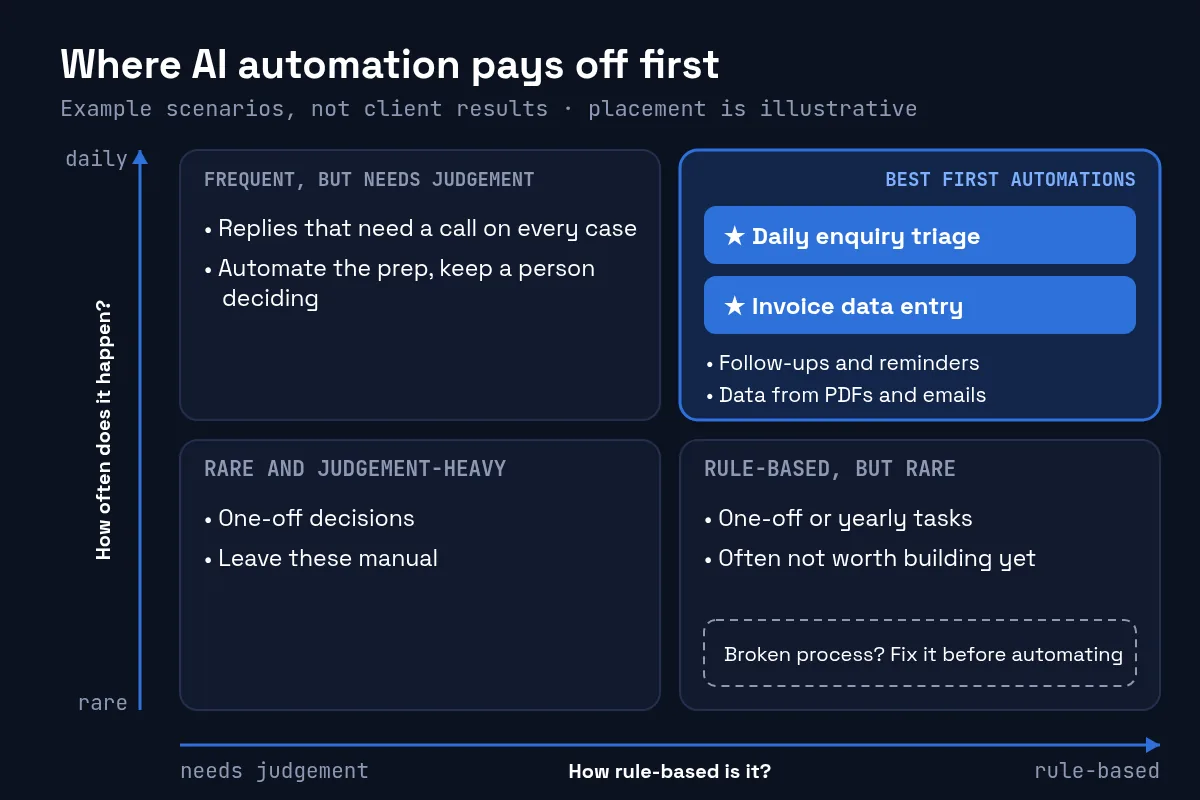
A simple test: is this a task someone on your team does every day and would happily stop doing? If yes, it's a candidate.
The best first automations happen often and follow roughly the same steps each time. It also helps if a mistake gets caught before it costs anything. Good fits for AI workflow automation include:
- Enquiry triage: sorting incoming messages by type and urgency, logging them, and preparing a suggested reply.
- Document data entry: pulling fields from PDFs, invoices or emails into your own system, with anything the AI isn't confident about held for a person to check.
- Follow-ups and reminders: chasing quotes, unpaid invoices or missing paperwork on a schedule.
- Internal summaries: turning a day's tickets or orders into a short note for the owner.
Example scenario, not a client result: an enquiry arrives after hours. The automation categorises it, logs it in your CRM and drafts a reply. In the morning, someone on your team reads the draft, edits a line and sends it. Nobody had to copy and paste anything, and nothing went to the customer unchecked.
Where it doesn't pay off (yet)
Some tasks look like good candidates and aren't:
- Rare or one-off work. If it happens twice a year, the build costs more than the time you'd save.
- Broken processes. Automating a messy process just gives you a fast, messy process. Fix the steps first.
- Judgement on every case. If each decision needs context only you have, the AI will draft something that you'll end up rewriting anyway.
If a task fits one of these, it's usually better left manual than automated and abandoned a month later.
Free Automation Lite vs a custom automation
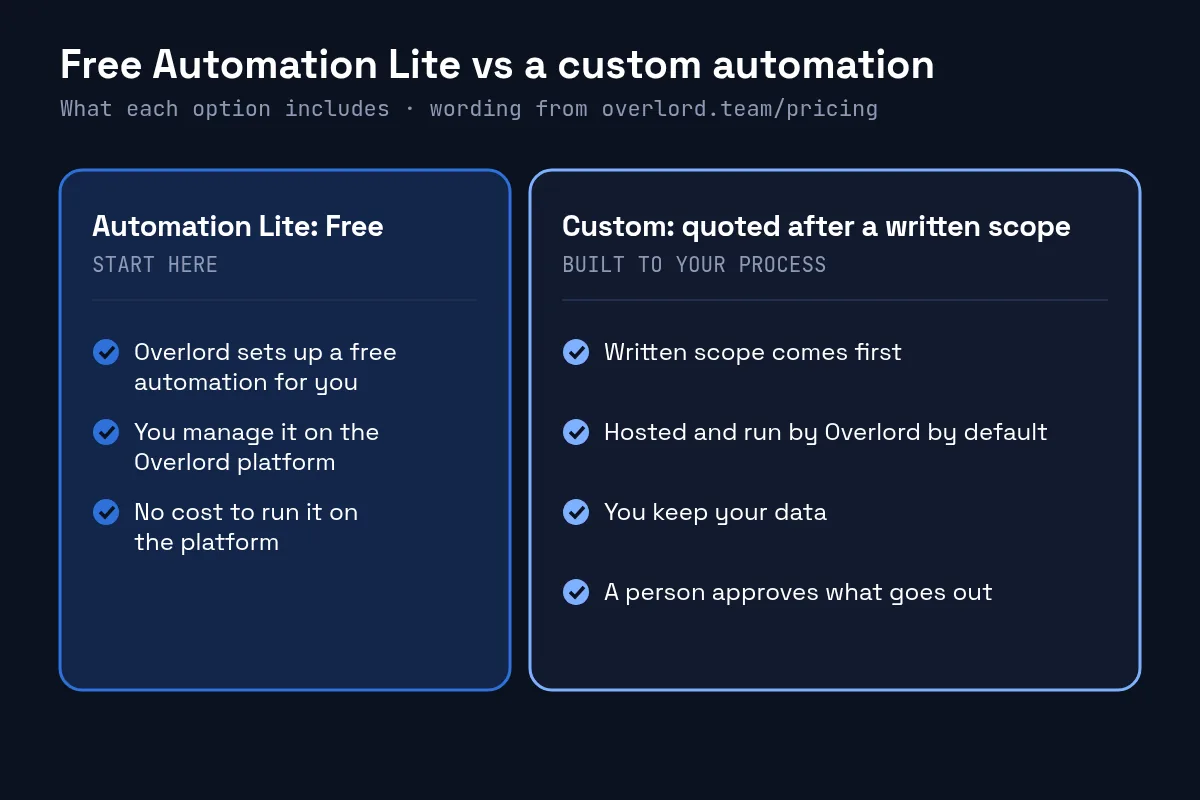
There are two ways to start with us.
Automation Lite | Custom | |
|---|---|---|
Price | Free | Quoted after a written scope |
Who sets it up | We do | We do |
Who runs it | You manage it on our platform | We host and run it by default |
How it's priced | No cost | Build, care and usage as separate lines, with a monthly cap |
Automation Lite: free. We set up a free automation for you, and you manage it on our platform at no cost. It's a low-risk way to see whether automation suits the way your business runs before you commit budget.
Custom: quoted after a written scope. For anything bigger, we scope the task in writing and quote build, care and usage as separate lines with a monthly cap. By default we host and run the automation, and you keep your data and the outputs. If you'd rather run it yourself, a handover with a workflow export and deployment notes can be quoted separately.
Every automation comes with a client dashboard showing its status, run history, usage against the limit you set, and an inbox for approvals.
A sensible point to move from automations to an agent is when a single automation has run reliably for a while and its run history shows people approving the same kinds of decisions again and again. Even then, the steps the agent can choose between should be written into the scope, and a person should still approve anything that reaches a customer.
How to start without open-ended spend
If you want to try AI automation services for your small business without signing up to an open-ended bill, this order works well:
- Pick one task your team does daily and would gladly drop.
- Write down what "done" looks like and what the automation must never do.
- Get a written scope and a fixed quote that states the monthly usage cap.
- Keep a person approving anything customer-facing, at least at first.
- Check the run history after a few weeks and decide whether to automate the next task.
If you'd like someone to look at step one with you, book a free 30-minute assessment.
Risks, data and compliance
Automation handles business data, often personal data, so the rules apply wherever you trade.
- UK: the ICO has guidance on AI and data protection under UK GDPR.
- EU: the European Commission's AI Act page sets out the risk-based framework.
- US: NIST's AI Risk Management Framework is a practical way to think through risks, and the SBA has a small business guide to AI.
- Australia: the OAIC has guidance on privacy and the use of commercially available AI products.
- Canada: the proposed Artificial Intelligence and Data Act (AIDA) was part of Bill C-27, which lapsed when that session of Parliament ended in January 2025. Check for newer federal rules before relying on it.
None of this is legal advice. In practice, it means knowing what data the automation touches, where it is stored, and who can see the outputs. If the automation connects to sensitive systems, managed security and monitoring is worth considering alongside it.
FAQ
How much does AI automation cost for a small business?
It depends on the task. We quote each automation after a written scope, with build, ongoing care, and platform and AI model usage as separate lines, and the quote states a monthly cap on usage.
Is there a free way to try AI automation?
Yes. With Automation Lite, we set up a free automation for you, and you manage it on our platform at no cost.
What tasks should a small business automate first?
Start with a task someone does every day and would happily stop doing, one that follows similar steps each time and where mistakes can be caught before they reach a customer. Enquiry triage and document data entry are common starting points.
What's the difference between an AI agent and an automation?
An automation follows set steps when something happens. An agent can choose between next steps on its own. Agents are more flexible but need tighter guardrails, which is why we keep a person approving anything customer-facing.
Do I keep my data if I stop using the automation?
Yes. By default we host and run the automation, and you keep your data and the outputs. A handover with a workflow export and deployment notes can be quoted separately.
How do you stop AI usage costs running away?
The quote states a monthly cap, and the client dashboard shows usage against the limit you set.
Does this work for businesses outside the UK?
Yes. OVERLORD Team is a UK firm and takes on work from businesses in the UK, Europe, the US, Canada and Australia.
How this guide was made: Ramin Moradi researched and wrote it with AI assistance, using the official sources linked above. Every external claim was checked against its source on 15 October 2026.
Want to find out whether one of your daily tasks is worth automating? Book a free 30-minute assessment, or ask about Automation Lite on our AI automation page.
Comments